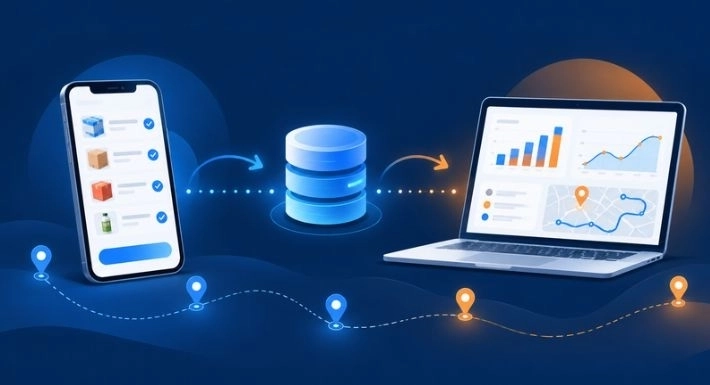
Purchasing products for a business involves more than deciding what to buy and how much to spend. Purchasing teams must communicate with vendors, record product requirements, maintain pricing information, account for taxes, and coordinate expected deliveries.
Consider a wholesale distributor planning to purchase 500 liters of cooking oil. Three suppliers offer different prices, discounts, and delivery schedules. The purchasing team needs to keep track of these details while ensuring that the required products reach the correct warehouse.
When purchasing information is scattered across WhatsApp conversations, emails, and spreadsheets, maintaining accurate records becomes difficult. Details can get overlooked, and teams may spend unnecessary time checking previous communications.
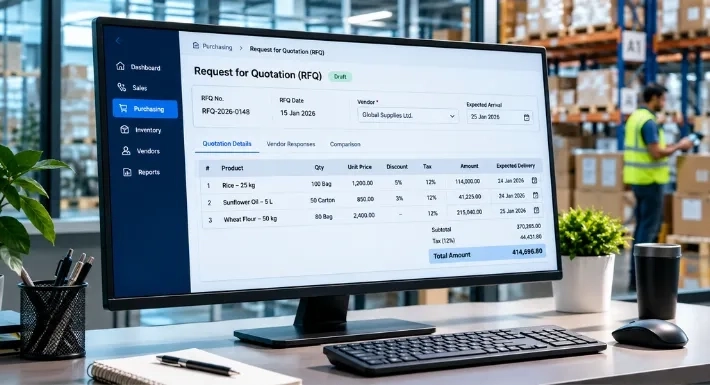
Request for Quotation (RFQ) management in SalesRoute ERP provides a structured way to record purchasing requirements, maintain vendor information, and organize product-wise quotation details.
Let's look at how the process works and how businesses can use it to manage their purchasing documentation.
What Is Request for Quotation (RFQ) Management?
A Request for Quotation (RFQ) is a purchasing document used by businesses to communicate their product requirements to suppliers and obtain relevant pricing and delivery information.
Before purchasing goods, a business may need to specify the products it requires, the quantities involved, and other purchasing conditions. An RFQ provides a documented format for recording these details.
For example, a distributor planning to purchase 500 units of cooking oil may prepare an RFQ containing the product quantity, expected price, applicable taxes, and anticipated delivery date.
An RFQ generally contains information such as:
- Product requirements: The items the business intends to purchase.
- Required quantities: The quantity needed for each product.
- Unit prices: The prices associated with individual products.
- Discounts and taxes: Applicable price adjustments and tax details.
- Expected delivery: The anticipated date for receiving the products.
Maintaining these details in a structured document gives purchasing teams a consistent reference for their requirements and supplier-related transactions.
How to Manage Purchasing Requirements Using SalesRoute ERP
SalesRoute ERP provides an RFQ management workflow for recording vendor information, warehouse details, purchasing requirements, and product-wise pricing.
To understand the process, consider the following business scenario.
Business scenario: ABC Wholesale Distributors needs to purchase cooking oil, rice, and sugar for its Kozhikode warehouse. Its purchasing team uses SalesRoute ERP to record the requirements and maintain the relevant quotation information.
Here is how the process is organized.
1. Select the Vendor
Start by selecting the vendor associated with the purchasing document.
For example, ABC Wholesale Distributors selects Malabar Trading Company as the vendor for its RFQ.
Associating the document with the correct vendor helps maintain supplier-specific purchasing records. When the team needs to refer to a previous purchasing requirement, the vendor information provides an important reference.
Selecting the appropriate vendor also establishes which supplier the recorded quotation details relate to.
2. Choose the Warehouse
After selecting the vendor, specify the warehouse where the purchased goods are expected to arrive.
In this example, ABC Wholesale Distributors selects its Kozhikode Main Warehouse.
Warehouse selection is particularly relevant for distributors and wholesalers that operate multiple storage locations. Purchasing teams need to know where incoming products are expected to be delivered so they can coordinate their inventory requirements.
Recording the intended warehouse alongside the RFQ also helps keep the purchasing document connected to the relevant stock location.
3. Enter the Purchasing Details
Once the vendor and warehouse have been selected, the purchasing team can enter the document information.
SalesRoute ERP provides fields for maintaining important purchasing details, including:
- Order Reference: A reference number used to identify the purchasing document.
- Order Date: The date on which the RFQ is created.
- Expected Arrival: The anticipated date of product delivery.
- Place of Supply: The relevant location used for tax-related information.
For example, ABC Wholesale Distributors creates an RFQ on November 6, 2026, and enters November 10, 2026, as the expected arrival date.
Recording these dates helps the purchasing team identify when the requirement was created and when the products are expected.
It also provides a useful reference when coordinating purchasing activities with warehouse operations.
4. Maintain Billing and Shipping Addresses
Billing and shipping addresses serve different purposes in a purchasing transaction.
SalesRoute ERP provides separate sections for maintaining these details.
Billing Address
The billing address identifies the address associated with the vendor billing transaction.
Shipping Address
The shipping address specifies the destination where the purchased products should be delivered.
For example, ABC Wholesale Distributors may maintain its registered business address for billing while using its Kozhikode warehouse address as the delivery destination.
Keeping these addresses separate is useful when the business's registered location and goods-receiving location are different.
Accurate address information also gives the purchasing team a clearer record of the intended billing and delivery details.
5. Add Products and Enter Pricing Details
Product information is central to an RFQ. The purchasing team needs to specify exactly which items it intends to purchase and the corresponding pricing details.
SalesRoute ERP allows users to add products as individual order lines and maintain their purchasing information.
For example, ABC Wholesale Distributors prepares the following purchasing requirement:
|
Product |
Quantity |
Unit Price |
|
Cooking Oil |
500 L |
₹120 |
|
Rice |
200 kg |
₹65 |
|
Sugar |
100 kg |
₹45 |
For each product, SalesRoute ERP provides fields to maintain:
- Product name
- Quantity
- Unit of Measurement (UOM)
- Unit price
- Discount
- Applicable tax
- Tax amount
- Subtotal
These details help the purchasing team review the cost associated with individual products instead of maintaining separate calculations in spreadsheets.
For instance, the team can identify the required quantity of rice, its unit price, and the applicable tax information within the corresponding product line.
Maintaining product-wise information also provides a clearer breakdown of the purchasing requirement.
6. Add Multiple Products or Import Items in Bulk
Businesses that purchase a large number of products may need to prepare RFQs containing dozens of individual items.
Entering every product separately can become repetitive, particularly for distributors that regularly purchase extensive product lists.
SalesRoute ERP provides options to add additional product lines and import multiple items in bulk.
For example, ABC Wholesale Distributors may prepare an RFQ containing:
- Cooking oil
- Rice
- Sugar
- Flour
- Pulses
- Other grocery products
Instead of relying entirely on repetitive individual product entry, the team can use the bulk import option when preparing the purchasing document.
This is particularly useful when handling larger product lists, as it reduces repetitive data entry during RFQ preparation.
7. Add Additional Notes and Review the RFQ
Product quantities and pricing do not always communicate every purchasing requirement.
There may be additional instructions that the purchasing team needs to record for the supplier.
For example, ABC Wholesale Distributors may need to specify:
- Deliver products before the specified date.
- Supply products with the required packaging.
- Confirm product availability before dispatch.
- Maintain the agreed product specifications.
Users can add relevant notes to the RFQ to record these additional requirements.
Before proceeding, the purchasing team should review the complete document.
A final review should cover:
- Selected vendor.
- Intended warehouse.
- Order reference and date.
- Expected arrival date.
- Place of supply.
- Billing and shipping addresses.
- Product names and quantities.
- Unit prices, discounts, and taxes.
- Additional purchasing instructions.
Once the information has been checked, users can proceed using the available actions in SalesRoute ERP.
This review helps identify missing information before the purchasing document moves to its next stage.
How RFQ Management Helps in Day-to-Day Business Purchasing
A well-maintained purchasing document gives businesses a clearer record of their requirements and the information associated with each purchasing transaction.
Here are some practical ways RFQ management can support daily purchasing activities.
1. Organized Vendor Information
Keeping vendor details associated with purchasing documents makes it easier for teams to refer to supplier-specific records.
Instead of searching through separate conversations and spreadsheets, employees can use the recorded purchasing information as a reference.
2. Better Visibility Into Purchasing Costs
Product-wise quantities, unit prices, discounts, and applicable taxes provide a clearer view of the estimated purchasing cost.
This information helps purchasing teams understand how individual product requirements contribute to the overall document value.
3. More Consistent Data Entry
A structured purchasing screen provides dedicated fields for recording important information.
This encourages employees to maintain vendor details, quantities, pricing, addresses, and other purchasing information systematically.
It can also reduce the likelihood of overlooking important details during document preparation.
4. Better Coordination With Warehouse Planning
Selecting the intended warehouse and recording expected arrival dates connect purchasing requirements with the relevant stock location.
For distributors managing multiple warehouses, this information helps teams identify where incoming products are expected to be received.
5. Convenient Handling of Large Product Lists
Bulk product import is useful when purchasing documents contain many different items.
Rather than entering every product through repetitive individual actions, purchasing teams can use the available import option to prepare larger product lists.
6. Centralized Purchasing Documentation
Maintaining purchasing information in a structured ERP environment gives teams a consistent place to refer to document details.
Vendor information, product requirements, pricing details, and delivery-related information can be reviewed together rather than being scattered across separate records.
Conclusion
Purchasing decisions involve several details that businesses need to record accurately. Vendor information, product quantities, pricing, taxes, warehouse selection, and delivery expectations all contribute to the purchasing process.
When these details are maintained across separate spreadsheets and communication channels, keeping track of purchasing requirements becomes increasingly difficult.
SalesRoute ERP's RFQ management feature provides a structured way to maintain these details within a purchasing document. From selecting vendors and warehouses to recording product-wise pricing and importing multiple items, the workflow helps purchasing teams organize the information required for their transactions.
For wholesalers, distributors, and trading businesses that regularly purchase multiple products, maintaining accurate purchasing documentation is an important part of managing day-to-day operations.
Looking for an ERP solution to manage your business purchasing requirements?
Explore SalesRoute AI to learn more about its capabilities.