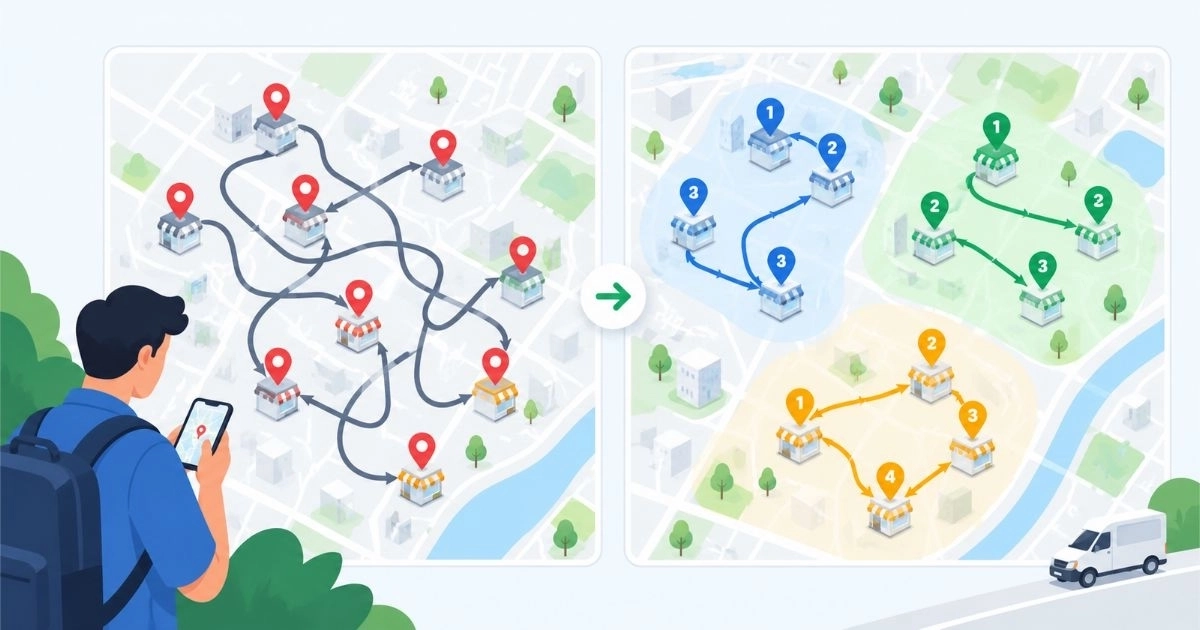
A field rep with 14 customers to see in one day has an enormous number of possible visit orders. Most reps pick one from habit, or from whatever the last manager suggested. Sometimes it works. Often it means crossing town twice, arriving at a closed store, or skipping the customer who needed attention most.
Sales route optimization fixes that. This guide explains what it involves, how to do it step by step, and when software starts to make sense.
The short answer: Sales route optimization means deciding which customers to visit, how often, and in what order, so reps spend more of the day selling and less of it driving. Start with customer priority and visit frequency. Then group nearby accounts and sequence the stops. Software becomes useful once the customer list outgrows a spreadsheet.
Route Planning vs. Route Optimization
The two terms are often used as if they mean the same thing. They don’t.
|
Route planning |
Route optimization |
|
|
Main question |
Which customers will I see today? |
What is the best set and order of visits, given my goals and limits? |
|
Based on |
Habit, memory, or a customer list |
Priority, location, time windows, visit frequency, and workload |
|
Typical result |
A list of stops |
A sequence that balances travel time with sales value |
Optimizing a sales route is also different from finding the shortest drive. A map app can tell a rep how to get from A to B. It can’t tell the rep that customer C is overdue for a visit, or that customer D only accepts deliveries before noon.
What to Decide Before You Build a Route
A good route starts with a few business decisions. Map tools can’t make these for you.
1. Customer priority
Not every account deserves the same attention. Sort customers into tiers based on order value, growth potential, or strategic importance.
2. Visit frequency
Each tier needs a rhythm. For example, top accounts weekly, mid-tier accounts every two weeks, and small accounts monthly. This is an illustration, so set numbers that reflect your own business.
3. Time windows
Some customers can only be seen at certain hours. Retail shops may be busy at peak times, and wholesalers may receive deliveries only in the morning.
4. Realistic daily capacity
A route that looks perfect on paper fails if it assumes 25 visits in a day when 15 is what a rep can actually manage with parking, waiting, and conversation time.
5. Territory boundaries
Routes should support how territories are divided. If reps keep crossing into each other’s areas to save a few miles, the result is confusion and uneven workloads.
How to Optimize Sales Routes: 6 Practical Steps
Step 1: Clean Up Your Customer Data
Optimization depends on accurate addresses, map locations, contact hours, and visit history. Duplicate customers and wrong map pins send reps to the wrong place, and no routing method can fix that.
Step 2: Tier Your Accounts and Set Visit Frequency
Write down how often each tier should be visited. This turns a vague goal such as “cover the territory” into a schedule you can measure.
Step 3: Group Customers by Area
Divide the territory into tight geographic clusters, and assign each cluster to a specific day or half day. This approach is often called “cluster first, route second,” and it keeps the problem manageable. Even a modest number of stops with time windows is hard to solve exactly, which is why practical tools rely on heuristic methods rather than testing every possible order.
Step 4: Sequence the Stops
Within each cluster, the place stops with fixed time windows first. Then arrange the flexible visits to avoid backtracking. Put high-priority customers early in the day, when the schedule is less likely to slip.
Step 5: Leave Room for the Unexpected
Urgent orders, traffic, and long conversations happen every day. Build a buffer into each route, or keep one or two low-priority visits that can be moved if the day falls behind. A route should guide the rep, not trap them.
Step 6: Review the Routes Regularly
Customers change, new accounts arrive, and territories shift. Many teams review routes weekly or every two weeks, and again whenever the customer list or visit rules change. Use real results, such as missed visits and time spent driving, to make adjustments.
A Hypothetical Example
A rep covers 18 accounts a week. Each Monday, the route runs north, then south, then north again, because that is how the customer list is sorted. Three customers are in the highest tier and should be visited weekly, but one is skipped most weeks because it sits at the far edge of the territory.
After regrouping, the rep covers the northern accounts on Monday and Tuesday, and the southern accounts on Thursday. The edge account is paired with two nearby stops on Wednesday, and Friday is kept for follow-ups and urgent requests. The accounts are the same, but the week has a clearer shape, and no top-tier customer is left out.
Common Mistakes to Avoid
- Optimizing only for distance
The shortest route can ignore your best customers.
- Treating every account equally
Low-value accounts can eat up time meant for growth accounts.
- Overpacking the day
More stops do not always mean more sales.
- Building routes once and never updating them
Outdated routes keep sending reps to the wrong places.
- Ignoring rep feedback
Reps know which customers are hard to reach at certain hours. Use that knowledge.
Spreadsheet, Map App, or Route Software?
The right tool depends on your size and complexity.
|
Situation |
Likely fit |
|
A few reps and a small, stable customer list |
A spreadsheet plus a map app may be enough |
|
Growing customer list and several territories |
A tool that stores customers, schedules visits, and tracks coverage |
|
Many reps, frequency rules, time windows, and frequent changes |
Dedicated sales route management software |
When you compare tools, ask these questions:
- Can it store customer locations, visit history, and visit frequency rules?
- Does it support route planning by day and by rep?
- Can reps use it on a phone, and does it work with weak connectivity?
- Can managers see which planned visits actually happened?
- Which route features are available on your plan today, and which are still being rolled out?
Where SalesRoute.ai Fits
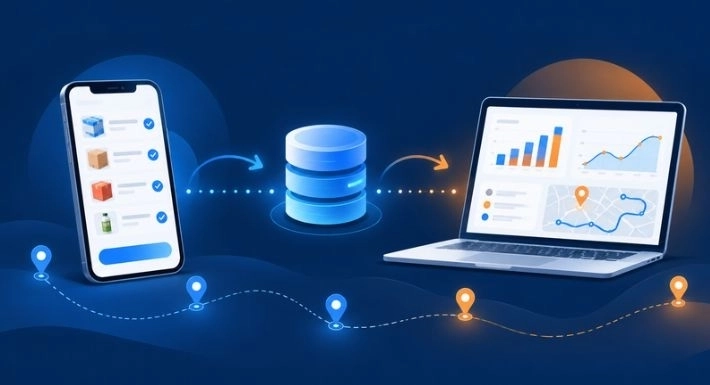
SalesRoute.ai is an AI-powered field sales management platform for distribution firms, direct store delivery (DSD) businesses, and field sales teams. According to its pricing page, these are the capabilities most related to route planning:
|
What you need |
SalesRoute.ai capability |
Plan listed |
|
Visit reminders |
Follow-up and visit reminders |
Basic, Standard, Advanced |
|
Route planning |
Route management |
Standard, Advanced |
|
Daily guidance |
AI agent for daily tasks |
Standard, Advanced |
|
Better visit sequences |
Advanced route planning and route optimization |
Advanced |
|
Field visibility |
Live GPS tracking, route deviation alerts, customer check-in and check-out |
Advanced |
|
Weak connectivity |
Offline access |
Advanced |
SalesRoute.ai also notes that its Advanced and AI+ features are being rolled out in phases, while the Standard plan is available today. Check the pricing page for current availability before you decide.
Good software supports your planning rules. It does not replace them. Settle your tiers and visit frequencies first, and the tool will have something useful to work with.
Want to see how route management fits your team? Explore SalesRoute.ai plans and features.
Frequently Asked Questions
1. What is sales route optimization?
It is the process of choosing and sequencing customer visits so field reps cover priority accounts with less wasted travel. It considers visit frequency, time windows, and workload, not just distance.
2. How do I optimize sales routes without software?
Tier your customers, set visit frequencies, group accounts by area, and assign each area to a set day. A spreadsheet and a map app can handle this for small teams, though it takes more manual updating as the customer list grows.
3. How often should sales routes be updated?
Review them regularly, such as weekly or every two weeks, and whenever new accounts, territory changes, or new visit rules appear.
4. Is the shortest route always the best sales route?
No. A slightly longer route may reach a high-priority customer on time or match a delivery window. The goal is selling time and coverage, not just fewer miles.
5. How does route optimization help distribution teams?
It helps teams cover customers consistently, plan around delivery windows, and balance workload across reps. Results depend on data quality and how well the plan is followed.
Final Thought
Better routes start with better decisions: who matters most, how often they need a visit, and what a realistic day looks like. Make those decisions first, then choose the tool that supports them.